Automotive Engine Air Filter Market Analysis with US$8.02 Billion Forecast and 6.33% CAGR
Other |
2026-08-18 09:17:52
 Russian
 English
 Romaian
 Portuguese (Brazil)
 Greek
Greek
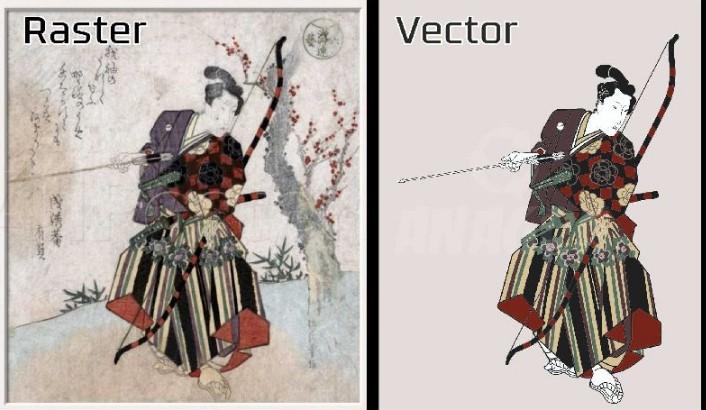
Have you ever enlarged a logo only to find blurry edges, rough lines, or missing details? This problem often happens when artwork is saved in a format that does not scale well.
Professional vector artwork creation offers a practical solution. It uses mathematical paths, curves, and shapes to build graphics that stay sharp at different sizes. Whether you need a business logo, product label, marketing graphic, or embroidery-ready design, vector artwork can help you achieve a clean and consistent look.
From small business owners to designers and print professionals, many people rely on vector graphics for everyday projects. Understanding how vector artwork is created can help you choose the right file format, improve your designs, and get better results across different applications.
Professional vector artwork creation is the process of designing or rebuilding graphics with paths, points, curves, and shapes rather than relying only on pixels.
Unlike raster images, which use a grid of colored pixels, vector graphics describe shapes mathematically. This allows them to be resized without the usual loss of sharpness.
For example, a vector logo can be used on a business card and then enlarged for a billboard without becoming pixelated.
Vector graphics use several basic elements:
Paths: Lines and curves that form the outline of a shape.
Anchor points: Points that control the position and direction of paths.
Curves: Smooth lines used to create rounded shapes and flowing designs.
Fills: Colors or other visual treatments placed inside shapes.
Strokes: Outlines applied to paths and objects.
These elements work together to create clean, editable artwork. Designers can change colors, adjust shapes, resize objects, and modify details without rebuilding the entire graphic.
Good vector artwork is more than a sharp image. It gives you a flexible design file that can support different business and creative needs.
One of the biggest advantages of vector graphics is scalability.
A well-made vector file can be enlarged or reduced without becoming pixelated. This makes it useful for logos, banners, signs, packaging, and digital graphics.
The artwork still needs to be prepared correctly for its intended use, but the underlying shapes remain sharp when resized.
Businesses often use the same logo across websites, uniforms, business cards, product labels, and advertisements.
Professional vector artwork helps keep the logo's shapes, spacing, and proportions consistent across these applications.
It also makes future changes easier. If you need to adjust a brand color or update a design element, an editable vector file provides a useful starting point.
Vector artwork is usually easier to edit than a flattened image when the file contains organized, editable objects.
A designer can change a color, move an icon, adjust a curve, or modify text without losing the quality of the other elements.
This flexibility is especially useful when creating different versions of a logo or preparing artwork for several products.
Printers often use vector artwork for designs that need clean edges, precise shapes, and accurate scaling.
Depending on the printing method, vector files can help prepare logos, labels, signs, stickers, and promotional materials.
However, the correct file setup still matters. Color profiles, fonts, bleed, line thickness, and other production settings may need to be checked before printing.
Vector artwork can also serve as a starting point for embroidery digitizing, cutting, engraving, and other production processes.
For machine embroidery, a vector file must usually be converted into stitch instructions. The artwork alone does not tell an embroidery machine how to stitch the design.
Similarly, cutting and engraving equipment may require specific paths, line settings, or file formats.
Different projects require different design approaches. Choosing the right service depends on your artwork and how you plan to use it.
Logo vectorization involves rebuilding an existing logo as clean vector artwork.
This is useful when the original logo is available only as a small JPG, PNG, or screenshot. A designer traces or recreates its shapes, adjusts the curves, and checks the proportions.
The result is an editable file that can be used for many print and digital applications.
Custom vector illustration creates original graphics from an idea, sketch, reference image, or creative brief.
Examples include mascots, icons, product illustrations, decorative artwork, and simple character designs.
Vector illustrations can use clean shapes and controlled colors to create a consistent visual style.
Image to vector conversion transforms raster artwork into vector paths.
Simple images with clear outlines and solid colors are often easier to convert than photographs with complex shading, textures, and color changes.
Automatic tracing tools can provide a starting point, but detailed artwork may require manual editing to remove unwanted points and improve the shapes.
Print-ready vector artwork is prepared for materials such as business cards, brochures, banners, packaging, and signage.
The designer checks dimensions, colors, outlines, and other details based on the printer's requirements.
Some print projects also require embedded or outlined fonts and a PDF or another approved export format.
Vector artwork can help digitizers understand the shapes and boundaries of a logo before converting it into stitches.
For example, a company logo with clear lettering and simple shapes may be easier to prepare for embroidery than a low-quality image with unclear edges.
However, embroidery requires additional decisions about stitch type, density, underlay, thread direction, and fabric behavior.
Creating high-quality vector graphics requires more than tracing an image. A careful workflow helps produce artwork that is accurate, editable, and suitable for its intended purpose.
The first step is to study the source image or design brief.
The designer identifies the main shapes, colors, text, proportions, and details that need to be preserved. If the source image is blurry, reference images or brand guidelines can help clarify the intended appearance.
At this stage, it is also important to confirm the final use of the artwork.
The designer creates paths and shapes that form the artwork.
Anchor points should be placed carefully so curves remain smooth without unnecessary complexity. Too many points can make the file harder to edit and may create rough edges.
For logos, accurate proportions and clean outlines are often more important than adding extra detail.
The next step is to reproduce the intended colors and lettering.
If the design uses a specific brand color, the designer should follow the supplied color values or approved reference. When the original color information is unavailable, a visual match may be possible, but exact accuracy cannot always be guaranteed.
Typography also deserves attention. The correct font, letter spacing, and alignment help preserve the design's original appearance.
Once the main shapes are complete, the designer checks the file for problems.
This may include:
Uneven curves or rough edges.
Overlapping shapes that should be separate.
Unwanted gaps between objects.
Incorrect proportions or alignment.
Extra anchor points.
Inconsistent stroke widths.
Unnecessary details that make the design harder to use.
These checks help make the artwork cleaner and easier to work with.
A professional vector file should be easy to understand and edit.
Related objects can be grouped, useful layers can be named, and unnecessary elements can be removed. Editable text should be preserved when appropriate, while outlined text may be needed for certain production workflows.
Keep an editable master file whenever possible. This makes future revisions much easier.
The final artwork should be saved in formats suited to the intended application.
Common vector formats include:
SVG: Useful for web graphics, icons, and supported design workflows.
AI: An editable format used in compatible illustration software.
EPS: Used in various print and graphics workflows.
PDF: Commonly used for sharing and print production when properly prepared.
PNG and JPG are raster formats, not vector formats. They may still be useful when you need a preview or image for a website.
Before delivering the artwork, confirm which formats the printer, client, or production service actually requires.
Understanding the difference between vector and raster files helps you select the right format for each project.
| Feature | Vector Graphics | Raster Graphics |
|---|---|---|
| Structure | Paths, curves, and shapes | Grid of colored pixels |
| Resizing | Can scale without pixelation | May become blurry when enlarged |
| Editing | Individual objects can often be changed | Pixel-level editing is common |
| Best uses | Logos, icons, diagrams, clean illustrations | Photographs and detailed textures |
| Common formats | SVG, AI, EPS, vector PDF | JPG, PNG, TIFF |
| Production use | Print, cutting, logos, and artwork preparation | Photos, web images, and image-based designs |
Neither format is better for every situation. Vector graphics are often ideal for clean shapes and scalable logos, while raster images are usually better for photographs and complex pixel-based details.
Some projects use both formats together.
Even a design that looks good on screen may have problems when edited, printed, or prepared for production.
Automatic image tracing can create many unnecessary anchor points, rough curves, and unwanted shapes.
Review the traced artwork and simplify paths where needed. Manual refinement often improves the file's quality and makes it easier to edit.
A design intended for a website may need different settings from artwork intended for a sign, embroidery project, or cutting machine.
Always explain how the file will be used so the designer can prepare the artwork accordingly.
Saving artwork in a file format that does not meet the recipient's requirements can create delays.
Confirm whether the project needs SVG, EPS, AI, PDF, or another format before the final export.
Too many small details can make a logo harder to read, especially when displayed at a small size.
Focus on clear shapes, balanced spacing, and useful details rather than adding complexity for its own sake.
A flattened image may not preserve individual objects or editable paths.
Keep the original vector file in a safe location so you can update colors, text, and shapes later without starting from scratch.
If you need artwork for a business or production project, the right designer can help you save time and avoid repeated revisions.
Look for examples that match your project. Logo vectorization, custom illustration, and print-ready artwork require different skills.
Check whether the samples have smooth curves, clean edges, accurate proportions, and consistent details.
Before placing an order, provide:
The original image or reference artwork.
The intended use of the design.
The required file formats.
The desired dimensions.
Any brand colors or font requirements.
A list of details that must remain unchanged.
Clear instructions help reduce misunderstandings and improve the final result.
Find out whether you will receive an editable source file and whether revisions are included.
If the artwork will be used for commercial production, confirm that the final file meets the relevant technical requirements.
Low-cost work may be suitable for simple projects, but complex artwork can require more time and attention.
Consider the designer's experience, turnaround time, communication, file organization, and ability to meet your specific requirements.
Use these simple tips to improve your next project:
Start with the clearest source image available. A high-quality reference makes it easier to reproduce the correct shapes.
Keep the design simple where possible. Remove details that do not improve recognition or function.
Check the artwork at different sizes. Make sure the design remains clear when reduced or enlarged.
Use consistent colors and proportions. This helps maintain a professional and recognizable appearance.
Confirm the final file format. Match the export to the needs of the printer, website, or production equipment.
Save an editable master file. Keep a version that allows future changes.
Review the final export. Open the delivered file and check that the artwork appears as expected.
These habits can help you create more useful graphics and avoid common production issues.
Professional vector artwork creation helps turn logos, illustrations, and other graphics into clean, scalable, and editable designs. It is useful for branding, print production, digital graphics, and preparing artwork for embroidery or other manufacturing processes.
The best results come from accurate shapes, smooth curves, consistent colors, organized files, and careful export settings. Just as important, the artwork must be prepared for its intended use rather than treated as a one-size-fits-all graphic.
Before starting a project, identify where the design will appear, which file formats are required, and what details must be preserved. With clear planning and careful execution, vector artwork can support a consistent visual identity and make future design updates much easier.
Professional vector artwork creation is the process of designing or rebuilding graphics using paths, curves, and shapes. It produces scalable artwork that can be edited and used across different sizes and applications.
Yes. JPG and PNG images can be traced or recreated as vector graphics. The result depends on the source image's quality and complexity. Photographs and detailed images may require more work than simple logos or icons.
The best format depends on the intended use. SVG is useful for many web graphics, AI supports editing in compatible design software, EPS is used in various graphics workflows, and PDF is common for sharing and print production.
Vector artwork can serve as a starting point for embroidery digitizing, but it is not usually ready for direct machine stitching. It must be converted into a compatible embroidery file containing stitch instructions.
The cost depends on the complexity of the design, the quality of the original image, the amount of manual cleanup, the required file formats, and the number of revisions. Simple logos generally require less work than detailed illustrations or complex artwork.